


Intuit Credit Karma
4.7443.65K Reviews
App Specs
- Version
- 26.30
- Updated On
- License
- Free
- Downloads
- 50,000,000+
- Developer
- Credit Karma, LLC
- Categories
- Finance
- Platform
- Android, iOS
Screenshots
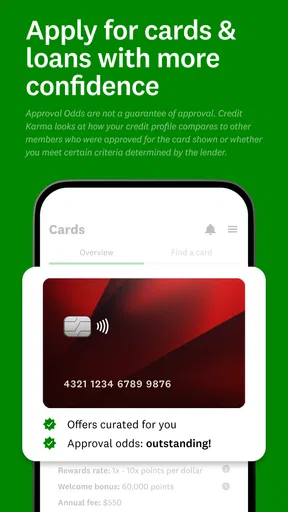
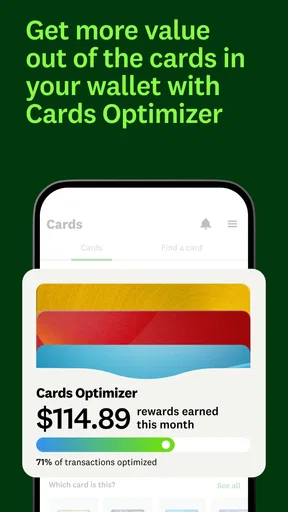
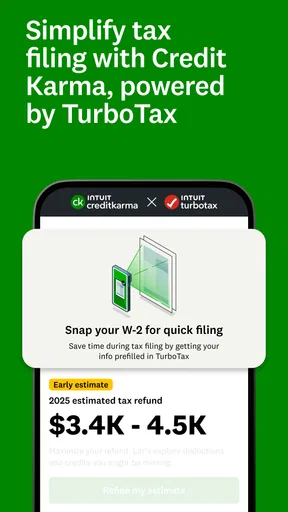

 Analysis by AppCompare
When money decisions spill across a household, it can be tempting to put every account on one phone and let everyone check the same screen. I’d resist that shortcut. Intuit Credit Karma is most useful as a personal view of credit and financial options, not as a shared household ledger. It can help one person keep an eye on their own profile while they coordinate conversations about bills, borrowing, or goals with a partner or family member.
One household, separate financial profiles
Picture a couple reviewing plans for a move after dinner. One person wants to understand their credit history before applying for a loan, while the other is checking their own finances. The app can make the first person’s information easier to revisit, but it should not be treated as a combined picture of both people’s credit. Each adult should make decisions from their own account and verify important details directly before acting.
That separation is useful even when finances are closely coordinated. A shared budget may show rent, groceries, and savings together, while credit records remain tied to individuals. I’d use Credit Karma to prepare questions and track changes in my own profile, then discuss the household decision outside the app. That avoids mistaking one person’s score or recommendations for a complete assessment of the family’s situation.
Set a boundary before handing over a phone
If someone else in the home wants to see how the app works, I’d demonstrate the general layout without leaving my account open for them to browse. Financial profiles are personal, and a device that is passed around for ordinary tasks can make it easy to expose information unintentionally. A household can share advice and goals without sharing sign-in access or treating one person’s account as a family account.
This matters particularly on a shared tablet or phone. Before lending a device, close the app and make sure the screen is not displaying financial details. I would also avoid making account changes or responding to recommendations while someone else is using my profile. That is a practical privacy habit, not a claim that the app has special household controls; the safest boundary is to keep each person’s account and device session personal.
Coordinate decisions without blending accounts
The app is better at supporting an individual’s financial check-in than managing household tasks. It can help you notice a change or consider an offer, but it is not a substitute for agreeing who pays which bill, maintaining a shared spending plan, or confirming what a lender will require. For couples, roommates, or relatives helping one another, I’d keep those coordination steps in a separate budget or conversation and use the app only for the profile it belongs to.
A useful routine is to check your own information first, write down the question it raises, and then bring that question to the household discussion. For example, if an alert prompts you to review an inquiry, verify what it relates to before assuming it is unfamiliar or alarming. That small pause helps prevent a notification from turning into a rushed family decision.
Worth Reading Before You Choose

Baby Panda World Brings Quick Play to Modern Phones, but Its Game Library Feels Busy

ESPN’s Live Game View Makes Following Close Games Easier

QuizzLand Review: A Good Fit for Short Trivia Breaks, Not Every Player

Basketball Stars: Multiplayer Is Fast, but Can It Recover When Matches Go Wrong?

WEBTOON Turns Phone Updates Into a Better Reading Routine

Link to Windows Runs on Shared Habits, Not Social Feeds
Age, trust, and the right expectations
Credit and borrowing conversations are easier to handle when everyone knows whose information is being viewed and why. The app is rated for Everyone, but that content label does not make it a children’s budgeting tool or mean a young person should use an adult’s account. I’d keep access with the person whose financial profile it represents and explain household money decisions in age-appropriate terms rather than sharing private account details.
Trust also means treating recommendations as prompts, not instructions. An offer that appears relevant to one person may not fit another person’s income, priorities, or repayment plans. Before applying for any financial product, compare the terms and consider the full household budget; an in-app suggestion is a starting point for research, not a guarantee that a choice is right.
Getting Started with Your Financial Journey
First things first, downloading Intuit Credit Karma is a breeze. Just head over to your app store, and in a few taps, you’re in. Setting it up is as simple as pie, too. You’ll need to provide some basic info, but nothing too invasive. Once you’re all set, you’re greeted with a sleek, user-friendly interface that makes you feel like a finance pro right from the get-go.
Features That Stand Out
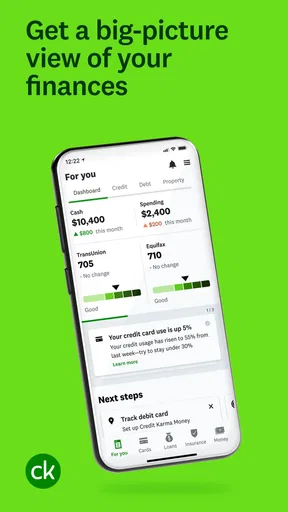
What I love about this app is that it offers so much more than just a credit score. You get a complete overview of your financial health, including credit reports from TransUnion and Equifax. And the best part? It’s free! No hidden fees or sneaky charges.
The app also gives personalized recommendations to help you save money and improve your credit score. Whether it’s finding a better credit card with lower interest rates or tips on how to manage your debt, Intuit Credit Karma has got your back.
Why You’ll Keep Coming Back
One of the coolest features is the credit score simulator. It lets you play around with different financial scenarios to see how they might impact your credit score. Thinking about a new loan or credit card? Simulate it first and see how it affects your score. It’s like having a crystal ball for your finances!
Plus, the app sends you alerts for important changes to your credit profile. So, if there’s a new inquiry or anything fishy going on, you’ll know right away. This is particularly useful for keeping identity theft at bay.
My Personal Experience
Personally, using the app has been a game-changer. It’s helped me stay on top of my finances without feeling overwhelmed. The insights and recommendations are genuinely helpful and have guided me in making smarter financial decisions. It’s like having a mini financial coach cheering you on!
What also stands out is the community aspect. The app has a vibrant community where users share tips and advice. It’s like a supportive forum where you can learn from others who are on the same financial journey.
Choosing it for the right job
Credit Karma is a finance app from Credit Karma, LLC, and I see its strongest role as a convenient credit-monitoring and decision-preparation tool. It is free, has a 4.7 average from around 3.1 million ratings, and has passed 50 million installs. That reach makes it a familiar option, but popularity alone should not decide whether it fits your habits. The current version is 25.50.1, and it runs on OS version 9 or later.
Compared with checking a bank’s app, this experience is more focused on credit information and related recommendations than on the day-to-day movement of one bank balance. Compared with a spreadsheet, it can surface profile information and suggestions without requiring you to build formulas, but it does not replace a household budget where every person’s income and expenses are reconciled. If your main need is tracking grocery spending or splitting rent, a budgeting tool is a better fit. If you want a place to periodically review your credit picture, this is more relevant.
A calmer way to use the simulator and alerts
I’d treat the simulator as a planning aid rather than a prediction. It can help you think through a possible borrowing choice before you make it, but a simulated outcome is not a promise of how a lender will assess an application or how your broader finances will develop. A practical use is to compare a few possibilities, note what you want to understand, and then check the actual terms and your budget before applying.
Alerts are most useful when they lead to a measured check, not an immediate conclusion. If a notice refers to a new inquiry or another profile change, look into the context and confirm whether it matches an action you recognize. If it does not, follow up through the appropriate official channel. An alert can help you notice something; it cannot, by itself, establish what happened or resolve an identity issue.
What to expect from recommendations
Personalized offers can be convenient when you are already comparing products, but they also shape the experience around financial choices that may benefit the provider. I would not accept an offer simply because it is presented as a match. Compare interest, fees, repayment conditions, and eligibility with options elsewhere, and ask whether opening another account supports a real goal. The app is most helpful when you arrive with a question of your own rather than browsing until an offer feels persuasive.
That distinction is especially important for someone working through debt. Suggestions may give you ideas to investigate, but no app can decide what payment plan is manageable across your whole household. I’d write down current obligations and essential costs first, then use recommendations as leads for further comparison. If the choice is complex or the consequences are serious, advice from a qualified financial professional may be more appropriate than relying on an in-app prompt.
Trust, privacy, and practical limits
Because the app brings personal financial information into one place, I’d use it thoughtfully: keep access private, use a device you trust, and avoid making a rushed decision from a notification. The same caution applies to the community area. Reading other people’s experiences may help you think of questions, but their circumstances can differ sharply from yours, so I would not treat informal posts as individualized financial advice.
There is also a difference between monitoring and repairing. Seeing information more clearly may help you notice a concern and decide what to investigate, but using the app does not automatically improve a credit profile or settle an error. The useful work still happens in the choices you make and the follow-up you take. For someone who expects an app to manage bills, negotiate debt, or make decisions on their behalf, this will feel too limited.
Who will get the most from it
I’d recommend it to adults who want a recurring, approachable way to check their credit profile, explore possible next steps, and stay alert to changes without paying for the app itself. It may also suit someone who is beginning to learn how credit decisions connect to borrowing and wants a starting point for research. A simple habit—checking when you have a specific question, rather than refreshing constantly—keeps the information useful without letting a score dominate every money conversation.
I’d steer away from it if you need shared household bookkeeping, detailed cash-flow planning, or a guaranteed answer about whether a particular loan will be approved. It is also not a good reason to give another person access to your financial account. For those needs, use a tool designed for budgeting or consult the institution handling the relevant account or application. Credit Karma can complement those resources, but it should not be asked to replace them.
Final Thoughts
In a nutshell, Intuit Credit Karma is more than just an app; it’s your financial buddy. It’s intuitive, packed with features, and, best of all, free. Whether you’re looking to improve your credit score, manage your debts, or just get a better handle on your finances, this app is an absolute must-have. Give it a try, and you might just find yourself looking forward to checking your credit score!
For a household, my verdict is more measured: it is a useful personal companion, not a shared financial command center. Keep accounts separate, discuss decisions together, and verify important details before acting. Used that way, it can make credit feel less opaque while leaving the actual household plan in your hands.
Pros
- User-friendly interface and navigation.
- Free credit score monitoring.
- Personalized financial insights.
- Secure with high-level encryption.
- Regular updates with new features.
Cons
- Limited to US and Canadian users.
- Occasional ad interruptions.
- No manual credit report updates.
- Limited customer support options.
- Not all credit factors explained.
FAQs for Intuit Credit Karma
What features does Intuit Credit Karma offer?
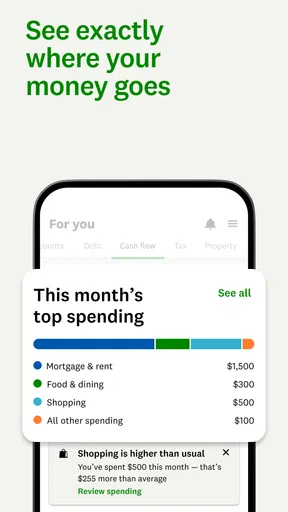
Intuit Credit Karma provides a range of features designed to help users manage their credit and finances. It offers free credit scores and reports from TransUnion and Equifax, personalized recommendations for credit products, and insights into how different actions can impact your score. Additionally, it includes tools for tracking spending, managing accounts, and simulating future credit scenarios.
Is Intuit Credit Karma safe to use?
Yes, Intuit Credit Karma is safe to use. The app employs robust security measures, including encryption, to protect your personal information. It doesn't require a credit card to sign up, and it offers free monitoring of your credit. Users should always ensure they download the app from official sources like the Google Play Store or the Apple App Store to avoid scams.
How does Intuit Credit Karma make money if it's free?
Intuit Credit Karma generates revenue through personalized product recommendations. When users sign up for credit cards, loans, or other financial products through the app, Credit Karma receives a commission from the financial institutions. This model allows users to access their services without any cost while still supporting the platform's operations.
Can Intuit Credit Karma affect my credit score?
No, using Intuit Credit Karma will not affect your credit score. The app performs a 'soft inquiry' to access your credit reports, which does not impact your score. This means you can check your credit as often as you'd like without worrying about any negative effects, allowing for regular monitoring and management of your credit health.
What should I do if I find errors in my credit report on Credit Karma?
If you discover errors in your credit report through Intuit Credit Karma, it's important to address them promptly. The app provides guidance on how to dispute inaccuracies with the credit bureaus. You can follow the steps within the app to submit disputes directly, ensuring your credit information is accurate and up-to-date.


